
Online Safety
We believe that teaching children about keeping themselves safe online is extremely important in this technology rich world we live in. Therefore, we have two member of staff that are dedicated to this area within school – Mr Kirkpatrick, our assistant head is our online safety lead and Miss Challinor is our Computing Subject Lead who supports in ensuring the children are well-educated in keeping themselves safe.
Online-Safety is all about being aware of the possible dangers and risks associated with using the Internet via a PC, laptop, mobile phone, iPad and game console. It also covers the use of electronic and online communication and wireless technology. It is vital, that children and adults, learn how to use the internet responsibly and make informed choices that will equip them now and in the future.

The DFE, believe it is important that in primary school, children are taught the importance of keeping themselves safe with a focus on the following:
- the rules and principles for keeping safe online.
- how to recognise risks.
- harmful content and contact, and how to report them.
- how to critically consider their online friendships and sources of information.
- how information and data is shared and used online
Filtering at Dothill Primary School
Filtering is preventative. It refers to solutions that protect users from accessing illegal, inappropriate and potentially harmful content online. It does this by identifying and blocking specific web links and web content in the form of text, images, audio and video.
At Dothill Primary School, we use Lightspeed to filter online content. This can be adapted to ensure that the there is no ‘over blocking’ thereby preventing unreasonable restrictions as to what children can be taught with regard to online teaching and safeguarding whilst maintaining a safe online experience.
Monitoring at Dothill Primary School
Monitoring is reactive. It refers to solutions that monitor what users are doing on devices and, in some cases, records this activity. Monitoring can be manual, for example, teachers viewing screens as they walk around a classroom. Technical monitoring solutions rely on software applied to a device that views a user’s activity. Reports or alerts are generated based on illegal, inappropriate, or potentially harmful activities, including bullying. Monitoring solutions do not block users from seeing or doing anything.
We use Senso to monitor online activity for all school-owned devices. Senso is a member of the Internet Watch Foundation (IWF) and Counter-Terrorism Internet Referral Unit (CTIRU), which is a required standard for monitoring systems as per government advice. It provides continuous 24/7/365 monitoring on all school-owned devices.
Educating the Children
We ensure that pupils are well educated on how to keep themselves safe online; this is one of the golden threads throughout the curriculum and has high priority within our use of ICT in school and computing lessons.
Each half term Mr Kirkpatrick and Miss Challinor lead on an assembly for the children to give a consistent message and reminders about keeping safe,
The Safeguarding Squad has six different areas to focus on throughout the year, one of them is linked to online safety and the children work with Mr Kirkpatrick and Miss Challinor.
CO:RE 4Cs Classification
Classification of online risk – the 4Cs
- The new CO:RE 4Cs classification recognises that online risks arise when a child:
- engages with and/or is exposed to potentially harmful CONTENT;
- experiences and/or is targeted by potentially harmful CONTACT;
- witnesses, participates in and/or is a victim of potentially harmful CONDUCT;
- is party to and/or exploited by a potentially harmful CONTRACT.
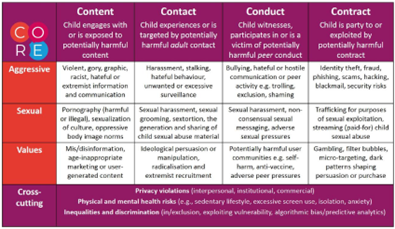
The risk classifications are useful for:
- Identifying the range and diversity of risks, including emerging risks.
- Making comparisons and capturing trends across risks and across time/contexts.
- Systematically communicating results and priorities to both expert and lay audiences.
- Highlighting the need for resources, budget and training.
- Classifying the types of risks reported via input from helplines and complaints mechanisms.
- Targeting planning, interventions and awareness-raising campaigns.
- Mapping evidence to risk categories and identifying evidence gaps.
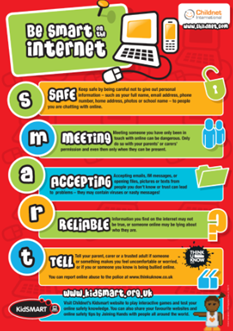
Be Smart on the Internet
We teach the children across the school how to ‘Be Smart on the Internet’. By following these five simple steps and considering the risks children will be themselves safe when using the internet.
Keeping Children Safe at Home
Parents and carers need to help keep their children safe when using the internet at home too. We support this by including information about online safety on the weekly newsletter. If you feel that you would like further guidance with this, please follow the links below:
Keeping children safe online | NSPCC